Sending UniFi logs to Wazuh can give an IT team a more useful view of what is happening across a network. The part that needs attention is the path between the devices and the person looking at the result. Turning on export is the beginning of that path, not the end.
From a deployment perspective, it helps to separate four questions: is UniFi sending the events you want, are they arriving, can the receiving system interpret them, and does somebody act on the useful ones?
These questions fit naturally into everyday setup, handover and troubleshooting. A recent event, a look at the configured destination and a conversation about responsibility can make the arrangement much easier to understand.
Quick Overview
| Part of the path | Practical question |
|---|---|
| Export | Which events are being sent, and to which destination? |
| Receipt | Can you see recent events at the receiver? |
| Interpretation | Does the platform understand the fields and event type? |
| Response | Who sees a useful alert and decides what to do? |
Last updated: October 16, 2026
Key takeaway
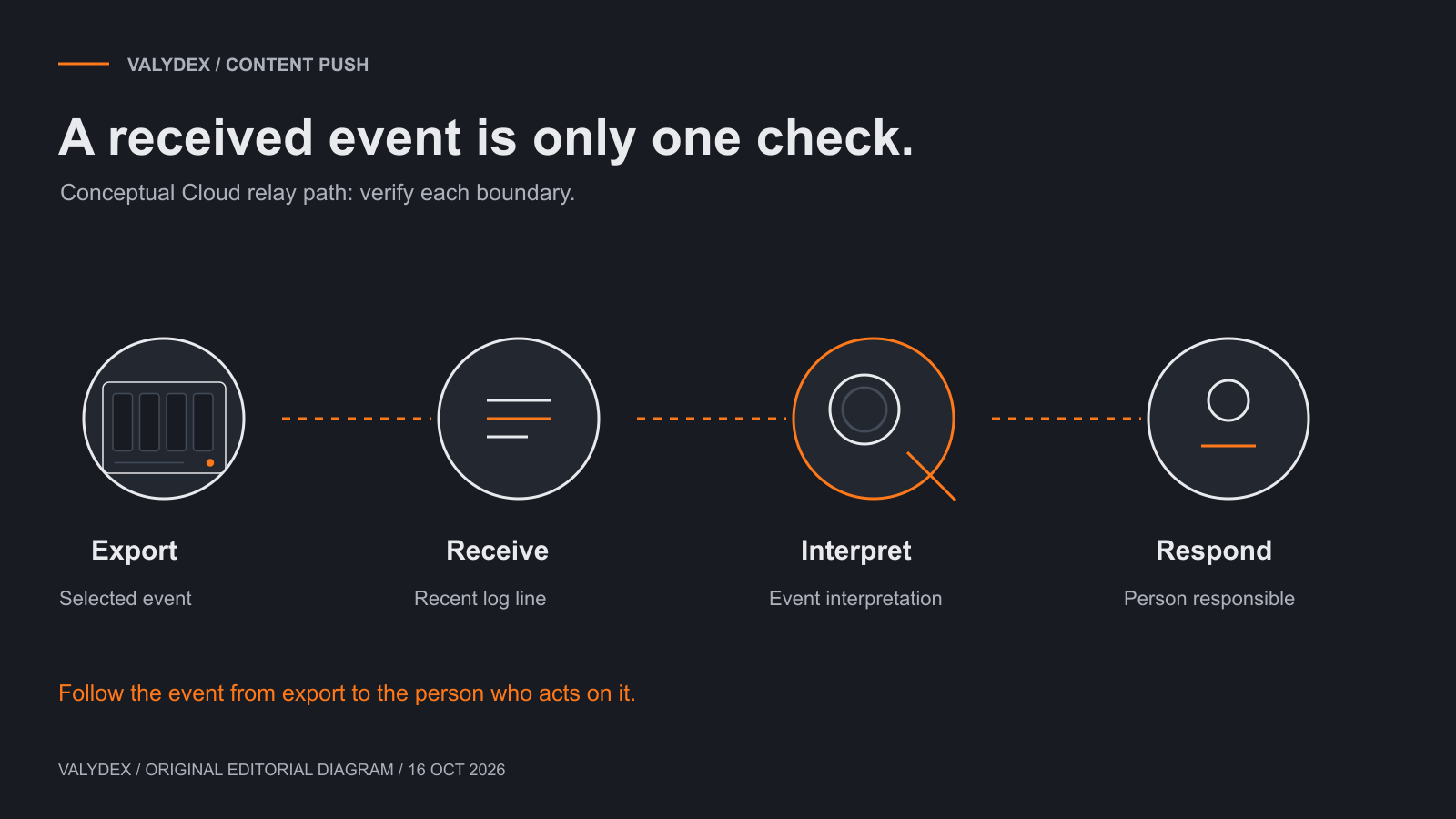
A conceptual view of the operating questions. The exact configuration depends on your deployment.
Start with the deployment you actually have
The right configuration depends on the UniFi device and software, the log categories you want, and whether you use Wazuh Cloud or run Wazuh yourself. Establish those details before following somebody else's configuration example.
Ubiquiti's logging documentation describes exporting selected system-log categories to an external destination and identifies CEF as the event format. That tells you something useful about the sending side. It does not, on its own, establish what the receiving system will do with every event.
For a documented Wazuh Cloud example, Wazuh's syslog-forwarding guide uses a relay endpoint with a Wazuh agent. Think of the relay as the place that receives the device's messages before forwarding them into the monitoring environment.
Keep that example separate from a self-hosted manager's configuration. The same product name does not make every deployment path interchangeable. When the instructions refer to a relay, agent or file location, make sure that part exists in the setup you are working on.
Are you exporting the events you need?
Check the selected event categories and destination before troubleshooting the receiving platform. A collection path cannot show an event that was never selected for export.
Use an ordinary, recent event that is available in the deployment. Note its approximate time and source so you can recognize it again. The aim is to give the investigation something concrete to follow, rather than staring at a dashboard and wondering whether anything should be there.
It is also worth agreeing what the business wants from the logging. Administrative changes, device availability and security-related events may answer different questions. Sending more information is not automatically useful if nobody has decided what to look at or how long it should be kept.
For the wider decision about whether the stack suits the team, see our UniFi and Wazuh guide. Here, keep the focus on the path already chosen.
Can the receiver see recent messages?
If the event is not reaching the receiver, concentrate on that connection before changing interpretation rules. Check the configured destination, the receiver's availability and the relevant network path.
A recent line at the relay or configured collection point is a useful observation. Match its time and source with the event you are following. If it is an old line, it does not tell you that the feed is working now.
When messages appear at the relay but not further along, look at the part responsible for reading or forwarding them. In a file-based arrangement, that includes the configured file and the process expected to read it. Follow the instructions for the actual deployment rather than copying a path from a different operating system.
Keep network changes narrow. Opening broad access or exposing a receiver to the internet is not a sensible shortcut for resolving an unclear local connection. Establish which devices need to send information and which receiver should accept it.
Arrival and interpretation are different questions
Seeing a message arrive does not mean the platform has identified its fields in a useful way. The event can be present as text while the information needed for a rule or search is missing or interpreted differently.
This is a common troubleshooting distinction worth keeping in mind with any logging setup. First establish that the message exists. Then look at how the receiving platform treats it. Otherwise, a transport issue can be mistaken for a rule issue, or the other way around.
Be careful with community configuration examples. They can be helpful starting points, but a decoder written around one event format or software version should not be treated as universal support for every UniFi event. Compare the example with the events you actually receive and the current platform instructions.
Avoid changing several decoders, rules and export settings together. Make the next change in the part of the path you are investigating, then look again at the same kind of event. That makes the next step easier to explain and avoids losing track of which change helped.
Who receives the useful result?
The collection path needs an operating arrangement around it. Decide which results deserve attention, where they go and who is responsible for responding.
A notification sent to an unused mailbox is an ownership problem, even if the software sends it successfully. Equally, a busy stream of low-value messages can make it difficult to notice the items the team actually cares about.
During handover, review the configured recipients and escalation route with the people involved. Use existing operational observations where available. A relevant recent event can help illustrate the route, while the configured recipients explain who should act on the next one.
For a small team, a clearly named role and a manageable set of useful notifications can be more practical than trying to send everything to everyone. The arrangement should fit the support hours and responsibilities the business has actually agreed.
What does a quiet period mean?
A quiet screen needs context. It might reflect an uneventful period, a collection delay, a disconnected source or simply a view that does not include the information you expected.
Look for recent records from the expected sources and compare their timestamps. If several sources disappear together, a shared receiver or forwarding process deserves attention. If one source is missing while others remain current, start with that source and its route.
These are useful places to begin, not a promise that every deployment has the same cause. Keep notes about familiar problems and the settings that matter in your environment. Good handover notes reduce the time spent rediscovering the arrangement when somebody else takes over.
Also decide how the team notices stale information. Do not assume that a system which reports selected events automatically reports every failure of its own collection path. Ask what is configured and who looks after it.
Keep the operating notes short and useful
The most useful notes explain the route, the responsible people and the few configuration details that would otherwise be difficult to recover. They do not need to become a folder full of test reports.
Record the sending devices, the receiver or relay, the relevant software versions and the person responsible for administration. Add a few familiar troubleshooting observations as they arise. If a screenshot genuinely helps, use a permitted copy with customer information removed; a diagram is often enough to explain the structure.
Remember the boundaries of the setup. Network logs are one source of information. Endpoint activity, identity access and the wider response process still need their own attention. The network security guide and endpoint protection guide explain those adjacent decisions.
Frequently asked questions
Related Articles
UniFi and Wazuh for small business
decide whether the combination fits the team available to operate it.
Endpoint protection guide
understand the device-side work that network logging does not replace.
- UniFi and Wazuh for small business: decide whether the combination fits the team available to operate it.
- Network security guide: put logging alongside the network controls it supports.
- Endpoint protection guide: understand the device-side work that network logging does not replace.
Choose your next security priority
Use the free assessment to organize the next conversation with your IT team.
Start the free assessment